
 New Platform Functionality
Role Groups
If you currently have a bucket role, Role Groups are a simpler way for you to allow candidates to apply to a group of roles. This will allow your team to evaluate which specific role would be a best fit for the candidate. This new setup includes lot of behind-the-scenes changes, including how candidates can apply for your roles. As a recruiter, it will now be easy to see all the roles a candidate is a fit for and advance them to the job that's a best fit. Watch the video to see the changes in how you'll evaluate candidates for grouped roles.
Introduction to Roles Group Help Article
In-app Help Center
To provide you more self-service support options, you'll be able to quickly and easily access Help articles within the product. Look for the ? icon next to the Search bar in the top right-hand corner.
.gif?width=600&name=ezgif.com-gif-maker%20(6).gif)
Qualified and Unqualified Tabs
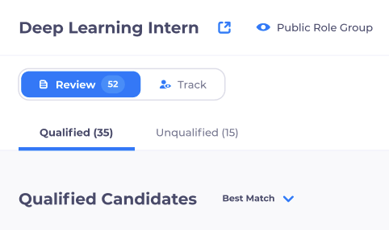
To prevent candidates from getting missed, you'll now see a Qualified and Unqualified tab side-by-side in your roles. It's never been easier to get back to candidates quickly!
Search and Sort Roles - August 12, 2022 Release
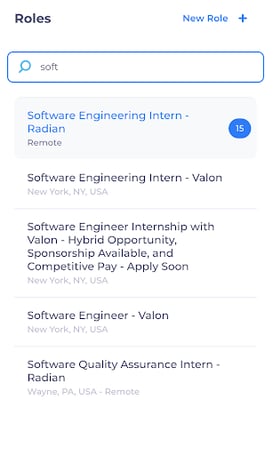
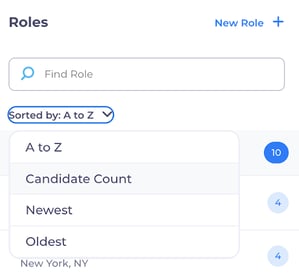
Have a lot of roles? The new Search and Sort make it easier to find roles quickly or focus on those that need your attention first.
Improved ATS Integrations
We have been working diligently to continuously improve your ATS integrations to ensure candidates or data never slip through the cracks. Below are a few highlights of recent integration improvements. Talk to your CSM to confirm your ATS integration setup or to get one started!
-
- Ability to automatically bulk-post jobs on LinkedIn
- Emerging Workday partner
- Pull in Workday custom questions and push the answers to the questions back into Workday
- iCIMS integration partner
- Import and sync all Greenhouse custom questions and EEO data
- Ability to push channel source into Greenhouse and Workday
- Greenhouse candidate sync will push candidates that applied in your ATS into RippleMatch for evaluation
 New Events Functionality
Check-in center
We've consolidated all the ways you can check-in candidates in one place so it's easy to select the method most convenient to your team.
.png?width=849&name=Product%20Newsletter%20Images%20(6).png)
Allow candidates checking in to upload a resume picture
While candidates are checking-in (those without a RippleMatch profile), they will be able to upload a picture of their resume for you to review.
Edit candidates when registering them for an event
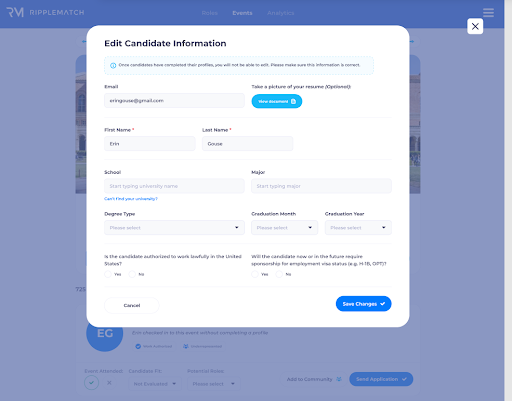
When you're registering or checking-in candidates at an event, typos can happen, leading to inaccurate data. You'll now be able to edit net-new candidates to ensure quality candidate data.
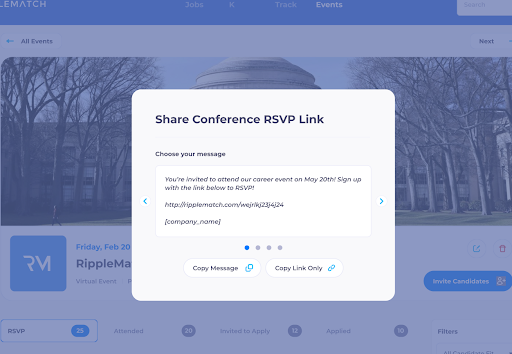
Suggested messages on tracking links
Tracking links now have pre-made templates to choose from when sharing and promoting your event. Tracking links allow you to easily see which of your marketing efforts leads to RSVPs.
Invite candidates to your network from a .csv upload
After uploading candidates from a .csv file, you can invite candidates with a partial profile to provide the remainder of their information. The gives you more rich data so it's easier to assess which candidates are the best fit for your open roles.
.png?width=400&name=image%20(3).png)
 New Sort Functionality
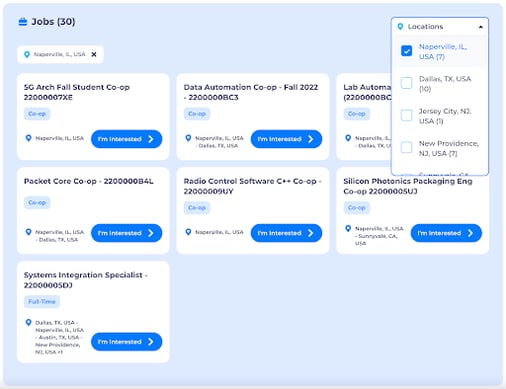
Filter jobs by Location on Company Branded Page
Candidates can now easily filter jobs on your Company Branded Page by location. This will help candidates find the right roles and allow you to deliver a great candidate experience!
Tracking Links for Company Branded Page
Create tracking links to see which sources are driving the most traffic to your Company Branded Page.